

Display Maestro gives you full control over attached displays, allowing the use of all available resolutions and bit depths. macOS strips out the useful ability to set specific resolutions and presents a more user-friendly approach. Experienced users, especially graphic designers and presenters, demand more precise control of their devices. Access exactly the resolution you need with Display Maestro's traditional-macOS-like menu.
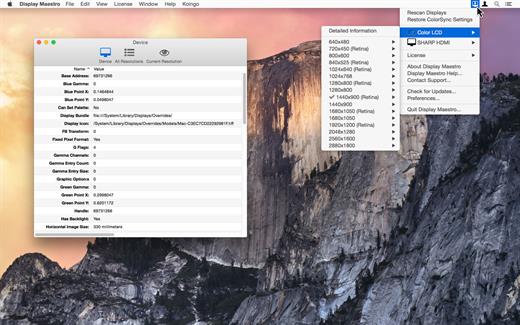
Details Unveiled
Pro users can also view advanced resolution and device information ranging from gamma configuration, RGB color points, scaling, samples per pixel, screen dimensions, device vendor IDs, refresh rate, manufacture dates, dots per inch, Retina (HiDPI) status, and more.
Also view feature information such as if the following are enabled are supported: pan enabled, simulscan enabled, is stretched, television mode, Desktop GUI support, interlace mode, mirroring supported, built-in, high-resolution capable, accelerator backed, and more.
Full Resolution List
Access the full list of resolutions and bit-depths supported by the graphics card and attached display. Note that some graphics cards may limit the display's options.
Legacy App Support
Older games and apps sometimes require the use of precise resolutions, and can no longer set these automatically due to changes in Mac OS. Display Maestro lets you pick exactly the configuration you need.
Safety First
Display Maestro implements functionality that will detect if an unsafe resolution was chosen and will automatically revert to the last known safe resolution if confirmation is not given.
What's New
Version 5.3.0:
- Release notes were unavailable when this listing was updated.
macOS 10.14 or later
Release Name: Display Maestro 5.3.0
Size: 38.2 MB
Download: Please Login or Register to see this code
